Words on a 3D grid road
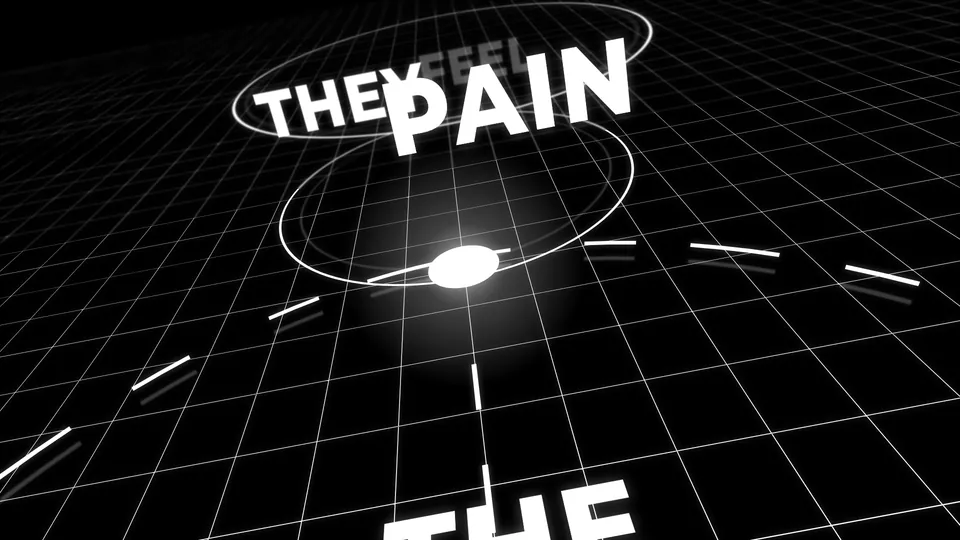
A 3D camera skims a black grid floor behind a glowing puck while your words rise from the road, some flat, some standing.
3D camera1.5–6 s16:9, 9:16, 1:1Build with Remotion, HyperFrames or HTML
Your prompt
Your prompt is ready
Leave your email to see it and copy it. Free during launch.
Paste it into Claude (Claude Code works best). It builds the scene and shows you 3 still frames before rendering. How to use it
About this animation
Some lines hit harder when the viewer flies through them. This shot drops the camera a few feet above an endless black floor ruled with a thin white grid, tilted slightly as if on a turn, and sends it rushing forward behind a glowing white puck that leaves a dashed trail. Your phrase is laid out along the road: some words lie flat on the floor, others stand up as the camera passes, and each one fades in just before it is read. Thin white rings lie on the ground, the nearest one dashed, and everything far away melts into a soft depth of field.
It is an exact copy of a 3D shot from a professional After Effects edit. The camera position, zoom and tilt, the 6,105-pixel rush of the floor, the race of the puck, the place, size and angle of every word and every easing curve come straight from the project, and the 3D projection is computed frame by frame the way After Effects does it. By default the shot ends the way the original edit does, with a hard cut at 1.5 seconds; choose Hold the last frame to let the words finish gliding apart and freeze the view.
Scene timeline
Second by second, with the example content. Timing adapts to your text.
- 0.0 s
Cut in with a shake
The shot opens with a quick 50-pixel shake that settles in a tenth of a second, as the cut lands. The whole frame also drifts down 50 pixels during the first second.
- 0.0 s
The floor rushes in
The grid floor races toward the camera, 6,105 pixels in 1.29 seconds on a curve that starts fast and eases into place, while the puck runs ahead and its dashed trail grows from 12 to 100 percent of its length.
- 0.0–0.63 s
Words fade in one by one
Each word fades in over about 0.2 seconds, the first ones lying flat on the road, the next ones standing up, the last one turned at an angle. As soon as it appears, each word glides away from its neighbors, fast at first, then very slowly.
- 1.0 s
Vignette
The edges of the frame darken slightly, picking up the look of the next shot in the original edit.
- 1.54 s
Cut
With Transition out, the shot cuts here, exactly where the original edit does. With Hold the last frame, the words keep drifting apart until 3.3 seconds, then the view freezes.
Frames from the scene
Entrance, middle and final hold, with the example content.


What you can customize
- Phrase
- Three to six short words work best: there are six places on the road, from the nearest to the farthest. With fewer words the last one keeps the final place; with more, neighbors share a place.
- Ending
- Transition out cuts at 1.5 seconds like the original edit. Hold the last frame plays the full 3.3 seconds of word movement, then freezes on the final view.
- Format
- Vertical 1080 × 1920 is the original framing. Landscape and square use the same camera, slightly pulled back, with the floor extended to the sides.
- Build with
- Remotion, HyperFrames or a single HTML file: the prompt ships the working code, so the shot is identical in all three.
Best for
Hooks for Shorts and Reels
A one-line promise flown through in a second and a half grabs attention in fast-paced vertical edits.
Business and marketing advice
Short rules of thumb such as “sell what people already want” read like a road to follow.
Transitions between chapters
Drop it between two talking-head sections to reset attention with a burst of depth and motion.
How to use it
Customize
Change the text, the color, the format and the tool in the panel above. The live preview follows as you type.
Unlock
Leave your email once to reveal the full prompt and copy it. It is free during launch.
Paste into Claude Code
Start Claude Code in a project folder (npx create-video for Remotion, npx hyperframes init for HyperFrames, any empty folder for plain HTML) and paste the prompt. Claude writes the scene with your content.
Check the 3 frames
Before any render, Claude shows you three still frames: the end of the entrance, the middle of the hold and the moment just before the exit. Ask for fixes until they match the preview.
Render
Approve and let Claude render the video: an MP4 to upload, or a transparent WebM or ProRes 4444 file for your editor. A plain HTML scene is captured frame by frame with a headless browser and FFmpeg.
Pro tips
- Put the strongest word last: it lands on the far place of the road, which stays in view when the floor stops.
- Keep words short. Long words take more room on the road and can cover the puck as they pass.
- Say the phrase quickly, in about a second: the words appear in the first 0.6 seconds and the shot cuts at 1.5 seconds.
- Use the cut ending between two clips with a whoosh or a bass hit on the cut.
Questions
Is it real 3D?
Yes. Every point is projected through the same camera as the original project, with its zoom, tilt and roll, so near words rush past huge while far ones stay small, and a depth-of-field blur softens everything far away.
Which font does it use?
Montserrat ExtraBold in capitals, slightly condensed to match the width of the original lettering. You can switch it from the Font menu.
Why is it so short?
The original edit cuts after 1.5 seconds, while the floor is still settling, and that is the default here. Choose Hold the last frame for a 6-second version that lets the words finish gliding.
Can I change the colors?
The design is pure white on black. Ask for an accent color in the notes field and Claude can tint the puck or the words in the code.
More animations
Browse the library